Keyless Container Image Signing in CI/CD Pipelines

Signing a container image helps teams verify who created the image and whether it has been modified after signing. But with key-based container image signing, you need to generate a private/public key pair and securely store, protect, and rotate the private key.
Managing these keys across multiple CI/CD pipelines can become difficult, especially when several teams are building and releasing container images.
Keyless container image signing solves this problem by removing the need to manage long-lived private signing keys while still allowing teams to verify the identity of the signer.
Let's learn about Keyless Container Image Signing.
What is Keyless Container Image Signing?
Keyless container image signing signs container images with temporary cryptographic keys and an authenticated identity instead of a permanent private key.
Let's see how this works at a high level before going into an actual example. When it is time to sign an image, the signer first creates a new key pair. This key pair is made only for this one signing.
But a key pair alone doesn't say who the signer is. So the signer proves their identity with an identity provider, such as GitHub, Google, or Microsoft.
Once the identity is confirmed, a certificate authority issues a short-lived certificate that links the verified identity to the temporary public key. With the certificate ready, the signer signs the image using the temporary private key. After that, the key is not stored for future use.
This creates a new question. The certificate expires within minutes. So how can anyone verify the signature later?
That is why the signing event is also written to a transparency log. The log only adds new entries and never changes old ones. Later, anyone can use it to confirm that the signature existed while the certificate was still valid.
This means you can sign and verify images without storing or rotating long-lived private keys. You can still tell who signed the image, because the identity is in the certificate.
That is the idea. Now let's see how it works in a real pipeline.
How Keyless Image Signing Works in CI/CD Pipelines
Let's say you have a GitHub Actions pipeline that builds a container image and pushes it to a container registry.
Instead of storing a signing key in GitHub Secrets, you can use Cosign with GitHub Actions OIDC, Fulcio, and Rekor to sign the image automatically.
The workflow looks like this:
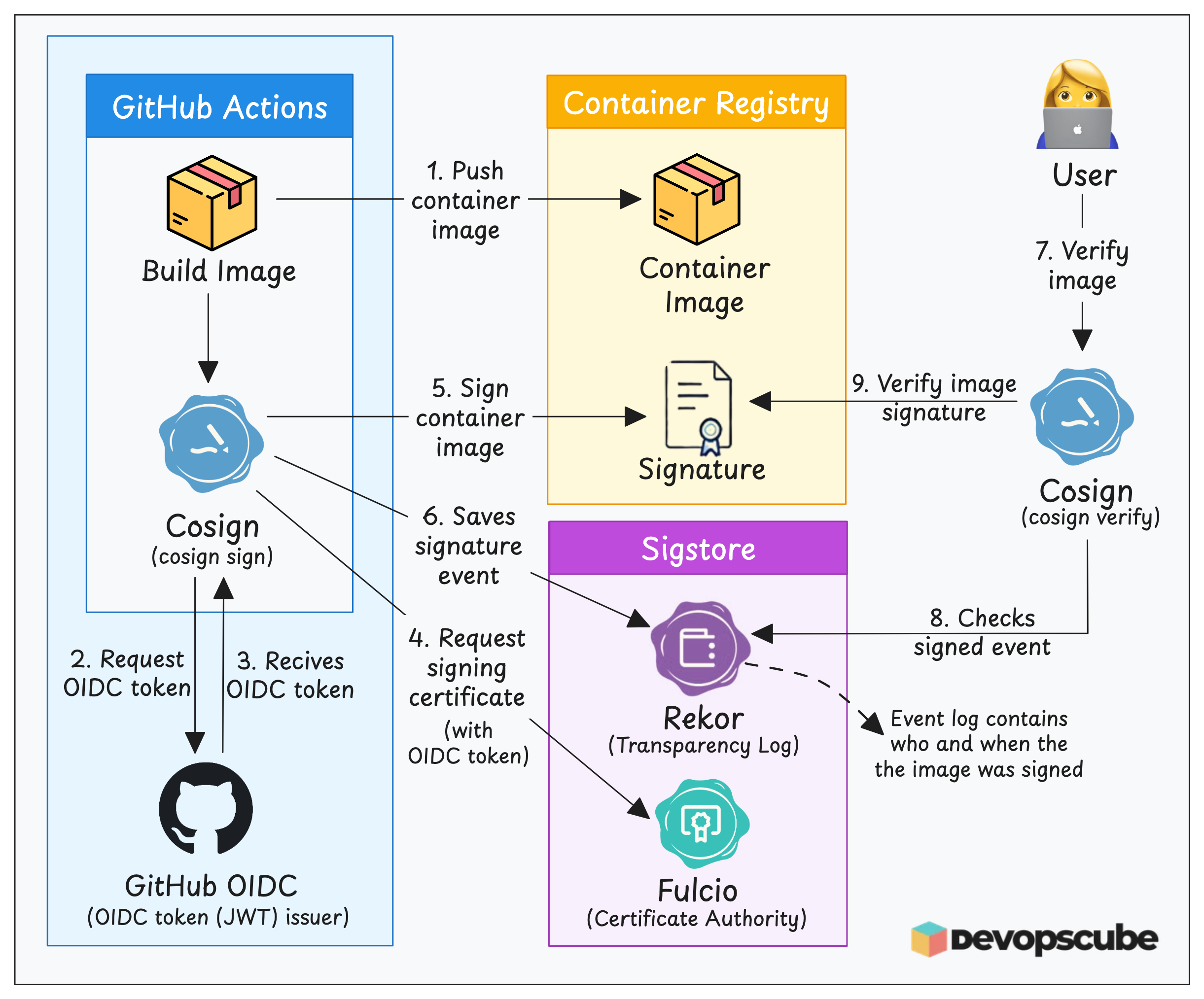
First, GitHub Actions builds and pushes the container image to the container registry.
Once the image is pushed, Cosign generates a temporary key pair and requests an OIDC token from GitHub to authenticate the workflow's identity.
Then, Fulcio validates the OIDC token and issues a short-lived certificate that connects the GitHub Actions workflow identity to the temporary public key.
At this point, Cosign has everything it needs to sign the image.
Cosign then signs the container image using the temporary private key and stores the signature with the container image as an OCI artifact in the container registry.
The signing event is then recorded in Sigstore's Rekor transparency log, which provides a publicly auditable record of the signing activity.
Because the signing key exists only for a short period, there is no permanent private signing key that needs to be stored in GitHub Secrets or a key vault.
id-token: write permission to request the OIDC token.Now the image is signed and stored in the registry. But signing is only half the work. Next, you must check the signature before you deploy.
How is the Container Image Verified?
Now let's say the signed container image needs to be deployed to a Kubernetes cluster. Before deploying it, how do you confirm that the image was signed by your trusted GitHub Actions workflow and has not been modified?
This is where we use Cosign signature verification.
During verification, Cosign retrieves the signature associated with the image and does the following checks:
- Checks that the signature is valid.
- Checks that the signing certificate was issued by a trusted certificate authority and matches the expected signing identity and OIDC issuer.
- Validates the Rekor transparency log evidence to confirm that the signing event was recorded.
In production, you can automate these checks in your CI/CD pipeline before promoting an image to the next environment.
You can also enforce signature verification using Kubernetes admission policies to reject images that don't meet your signing requirements.
So, keyless signing helps in creating a trustworthy image, while image scanning and securing your build pipeline remain important.