Kubernetes Client-side Vs Server-side Apply
Kubernetes offers two ways to apply changes to resources: Client-Side Apply (CSA) and Server-Side Apply (SSA).
Both can create or update resources from a manifest, but they handle the apply process differently.
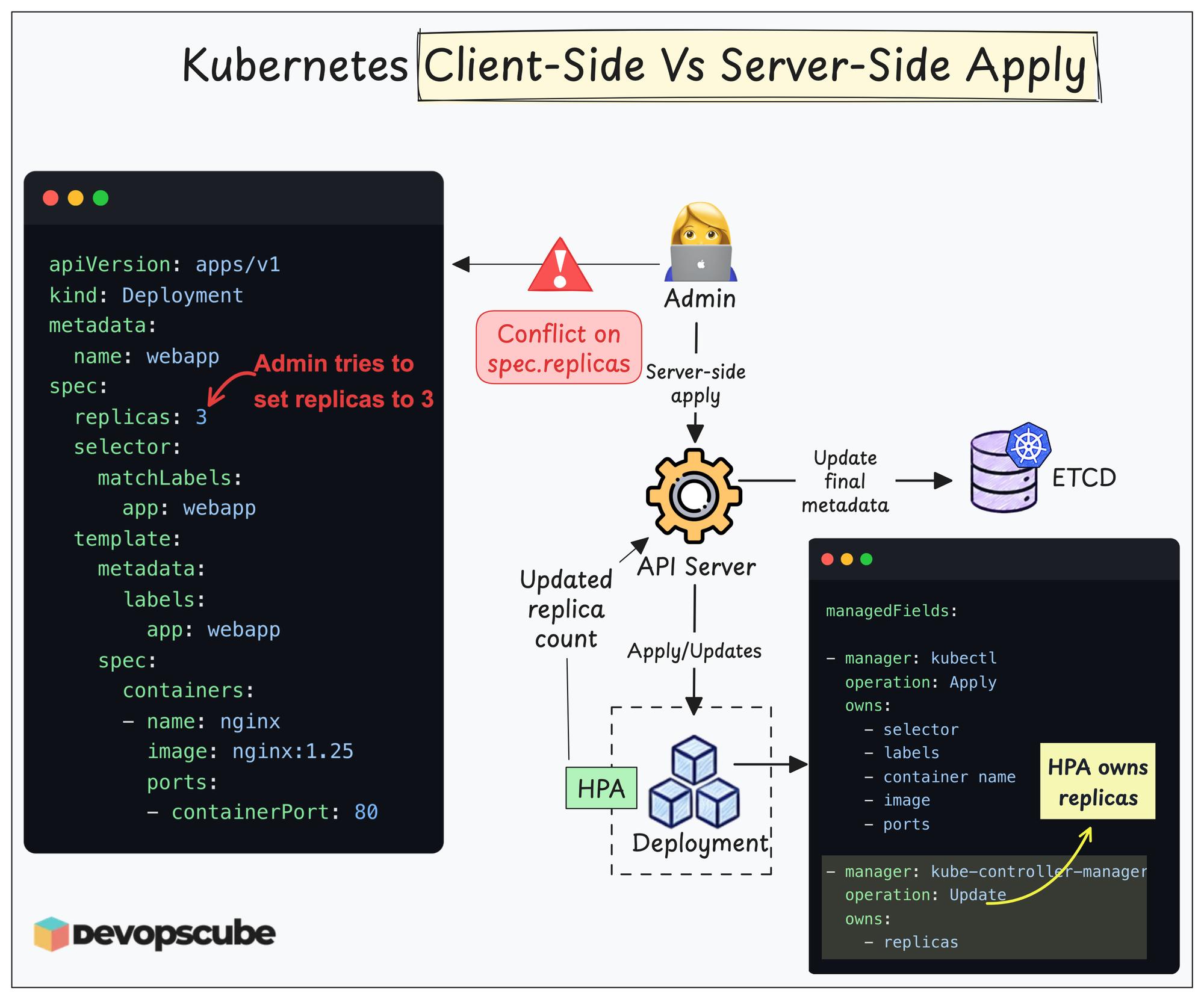
Let's look at how these apply strategies work.
Client-Side Apply
When you run kubectl apply, kubectl uses Client-Side Apply (CSA) by default.
Client-Side Apply means that kubectl itself decides what needs to change before sending the request to the Kubernetes API server.
To do this, kubectl compares three things:
- The manifest you are applying now
- The current resource running in the cluster
- Configuration that was applied previously.
Based on these three, kubectl determines what needs to be added, changed, or removed and sends the required patch to the Kubernetes API server.
Once applied, the configuration will be stored inside the resource as an annotation.
This is why it is called Client-Side Apply. Most of the apply logic happens on the client side, inside kubectl.
Server-Side Apply
Server-Side Apply (SSA) works differently.
When you run kubectl apply with the --server-side flag, the Kubernetes API server handles the apply process. But the main advantage of Server-Side Apply is that it tracks field ownership.
For example, one controller may manage the container image, while another manages the replica count.
If two controllers try to apply different values to the same field, Server-Side Apply gives a conflict message instead of simply overwriting the other manager's value.
Avoiding Configuration Conflicts with Server-Side Apply
SSA becomes useful when the same Kubernetes resource is managed by multiple systems.
For example, a Deployment may be updated by a GitOps tool, a Kubernetes controller, and an engineer using kubectl.
- With Client-Side Apply, kubectl primarily tracks what you previously applied.
- With Server-Side Apply, Kubernetes tracks who manages each field.
That makes it easier to detect conflicting changes and allows different tools or controllers to safely manage different parts of the same resource.
For simple workloads managed by one workflow, Client-Side Apply is usually straightforward.
When multiple controllers, automation tools, or teams manage the same resources, Server-Side Apply provides much better ownership and conflict handling.
--force-conflicts flag. This overwrites the conflicting value and transfers ownership of that field to the manager performing the apply, so it should be used carefully.